
Conference Room AV Installation in San Jose CA – Clear Video, Clean Audio & One-Touch Meetings
Displays, cameras, microphones and speakers installed and tuned as complete video conferencing solutions, so meetings start with one touch and remote attendees see and hear clearly.
Conference room AV installation is part of our audio visual services. We set up huddle rooms, conference rooms and boardrooms for commercial offices across San Jose and neighboring cities.
- California C-7 telecom license (CSLB #[NUMBER])
- Teams and Zoom room hardware
- Tested with live calls
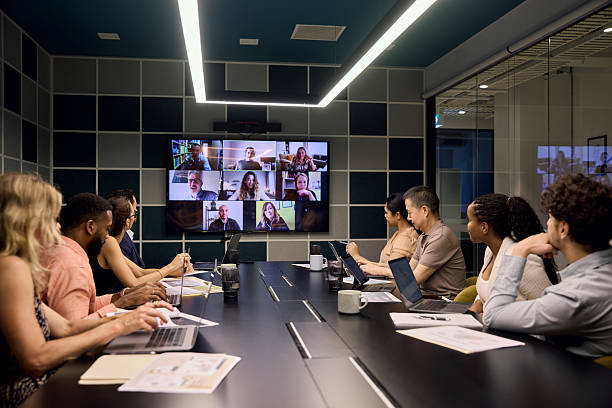
What Goes Into a San Jose Conference Room
Every piece of the system that makes meetings look and sound right.
Display systems
One or two screens sized so the farthest seat can read shared content, mounted at a comfortable viewing height.
Video conferencing cameras
Auto-framing cameras placed near the screen at eye level, so remote attendees see faces, not the tops of heads.
Microphones and speakers
Ceiling mic arrays or table mics with ceiling speakers, tied to an audio processor with echo cancellation.
Table connections
HDMI and USB-C at the table, plus wireless presentation and signal distribution so guests can share to every screen without cables.
Room control
A touch panel for one-touch join and room automation of lights and shades, plus scheduling panels outside the door.
Cabling and pathways
Every run hidden and tested. See our AV cabling page for the details.
Need lobby displays, training rooms or background music too? See our full audio visual service.
Audio VisualSetups by Room Size for San Jose Offices
The right equipment depends on how many people use the space, from small San Jose startups to large boardrooms.
| Room | Typical setup |
|---|---|
| Small (4 to 6 seats) | One screen and an all-in-one video bar with built-in lens, mics and speaker |
| Medium (6 to 12 seats) | One large or two screens, video bar or separate camera, table or ceiling mics, touch control panel |
| Large and boardroom (12+ seats) | Dual screens, multiple cameras, ceiling mic arrays, ceiling speakers and an audio DSP |
| Divisible rooms | Audio video systems that work as one space or two, switched from the control panel |
Teams, Zoom and Bring-Your-Own Rooms in San Jose
We install the hardware for the platform your team already uses.
Microsoft Teams Rooms
Certified room kits with a touch panel for one-touch Teams calls.
Zoom Rooms
Zoom-certified bars and kits with a controller on the table.
Bring your own meeting
A USB connection lets any laptop use the space’s cameras, mics and speakers on any platform.
System integration and your IT team
We handle hardware installation and system integration. Accounts, licensing and software configuration are handled by your IT team.
What Makes a Meeting Room Work Well in San Jose
Good calls come from the space as much as the solutions in it.
Acoustics first
Glass walls and hard tables cause echo. We flag acoustic issues early and can recommend panels before mics go in.
Camera and lighting
Cameras are aimed and lighting is checked so faces aren’t backlit by windows.
Network ready
Room systems get wired drops on your network infrastructure, not Wi-Fi, for stable calls and simpler networking.
Simple to use
One touch to start a call, one cable or wireless share to present, and a short guide on the table.
Our Professional Installation Process in San Jose
Six steps from site walk to trained staff on every San Jose project, with professional installation throughout.
Site walk
We measure the space, check walls, ceiling, light levels and acoustics, and learn how meetings run.
Room design
Screen size, cameras, mics, speakers and control are planned with an itemized estimate covering the full system.
Cable and prep
Cable, blocking, floor or table boxes and data drops go in.
Install
Screens, cameras, mics, speakers and panels are mounted and connected.
Tune and test
Audio levels, echo cancellation and auto-framing are tuned with live test calls.
Train and hand off
Staff learn to start calls and share content, and you get an equipment list for the space.
Conference Room Audio Video FAQs for San Jose
Quick answers to the questions we hear most.
Dedicated room system or bring your own laptop?
A dedicated Teams or Zoom room starts calls with one touch. A bring-your-own setup is simpler and works with any platform. Many rooms support both, and both are solutions we install.
Why do remote people hear an echo?
Usually poor echo cancellation or a reflective space. Proper mic placement, DSP tuning and acoustic panels fix most cases.
How long does an install take?
A small space with a video bar often takes a day. Larger spaces with ceiling mics and a DSP take a few days, plus cabling time.
Can you upgrade our existing room?
Yes. We often reuse cable and mounts and replace older cameras, speakerphones and display systems with current conferencing solutions.
Related San Jose Services & Nearby Cities
Explore related pages, our other services, and the nearby cities we cover.
Nearby cities we serve
We also serve these 10 neighboring cities. Pick yours to see local service details.
Request a San Jose Conference Room AV Quote
Tell us how many spaces, their sizes and which platform you use. We’ll return an itemized estimate covering equipment, cabling, conferencing installation and tuning, with solutions sized to each space.
C-7 Licensed Installer & Contact Details
San Jose Telecom Techs97 E Brokaw Rd, San Jose, CA 95112
Email: [email protected]
What to include in your request
- Number of spaces and seats in each
- Meeting platform (Teams, Zoom or other)
- Existing system or equipment to reuse
- Wall and ceiling types
- Target completion date